Track every purchase order and invoice from draft to paid
Government Procurement Software
One Procurement Platform.
Every Operational Purchase Under Control.
GovOps360 is government procurement software that brings catalog search, requisitions, approvals, purchase orders, fulfillment tracking, invoicing and reporting into one platform for public agencies buying everyday operational goods.
Built for public agencies buying everyday operational goods
What Is Government Procurement Software?
Government procurement software is the system public agencies use to buy goods and services through a controlled, auditable process, from searching an approved catalog to issuing purchase orders, matching invoices and reporting on spend. State and local governments, school districts and other public entities often purchase through cooperative contracts, which let them use a competitively solicited agreement instead of running a new solicitation for every purchase. GovOps360 brings catalog search, purchase orders, invoicing and order tracking into one platform for agencies buying everyday operational goods, including office supplies, janitorial and facilities products, safety and PPE, and technology accessories.
What Is Public Sector Procurement?
Public sector procurement is the process government agencies and other public entities use to buy the goods and services they need to operate, using public funds. Unlike private-sector purchasing, it is shaped by rules on competition, transparency and accountability. Purchases come from competitively awarded contracts, are approved by designated staff within set spending limits, and are recorded so auditors and the public can review them.
For everyday operational goods like office supplies, cleaning products, safety equipment and computer accessories, the challenge is volume. Hundreds of small purchases across many departments still need the right approvals, pricing and records. Public sector procurement software keeps them in one system instead of paper forms, email approvals and spreadsheets.
The Complete Government Procurement Lifecycle in One Place
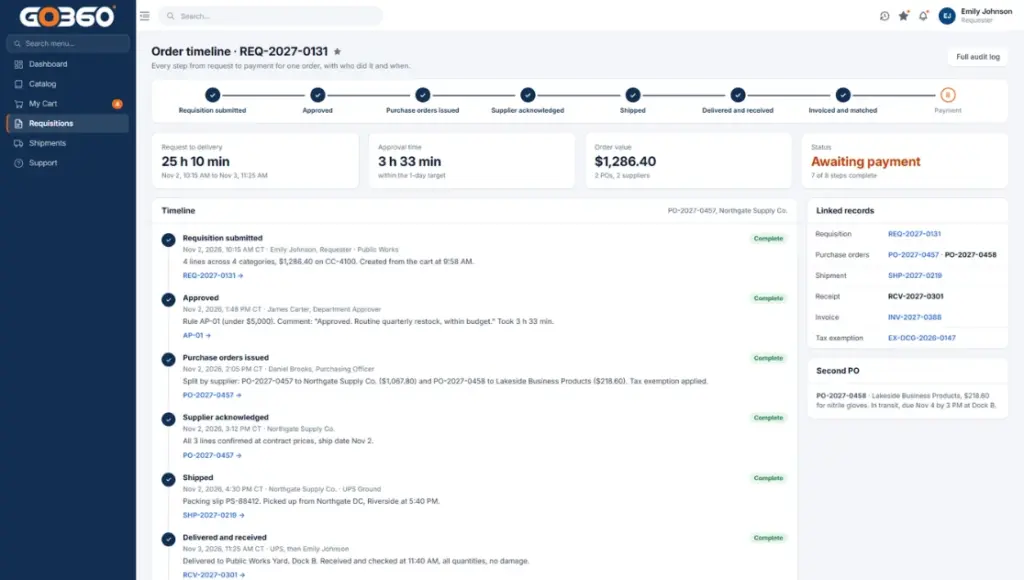
Every purchase follows the same nine steps, from the first catalog search to the final spend report. Each step has a clear owner, and requisition, approval, purchase order and invoice details stay on one connected record.
Search: Requester
Select: Requester
Requisition: Requester
Approval: Approver
Purchase Order: Procurement Officer
Fulfillment: Procurement Officer
Invoice: Finance
Audit: Auditor
Reporting: Procurement Officer
Requester
Agency staff who need supplies. They search the catalog, add items to a cart and submit a requisition with their department and cost center.
Approver
Department managers who review each request against the agency’s purchasing rules and approve or reject it before any order is placed.
Procurement Officer
Purchasing staff who issue the purchase order to the supplier, follow fulfillment through delivery and report on agency spend.
Finance
Finance and accounts payable staff who match each supplier invoice to its purchase order and track payment status.
Auditor
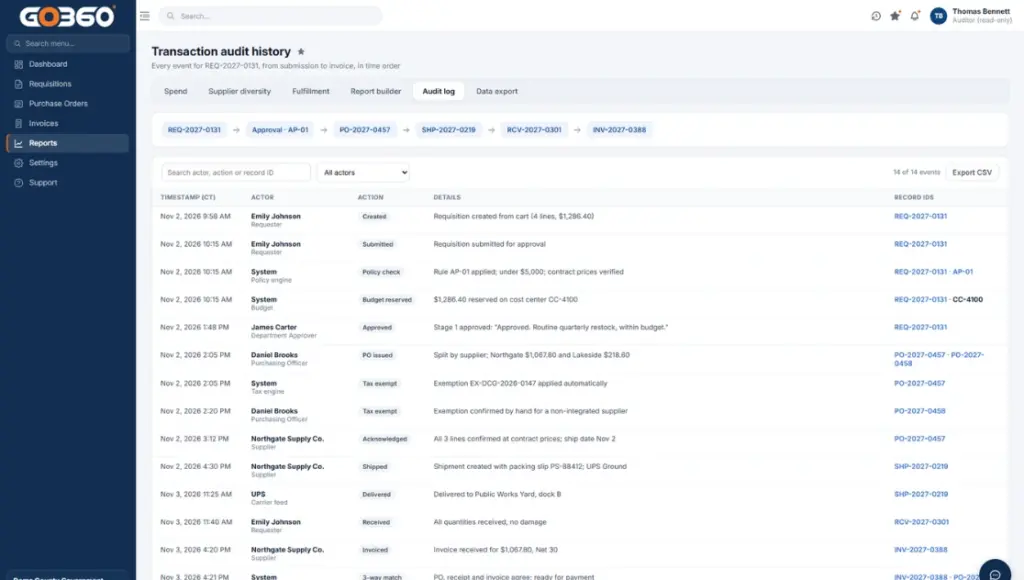
Internal or external reviewers who see the complete transaction history (who requested, who approved and what was paid) with read-only access.
Built For Government and Public Agencies
Public Sector Procurement Software for Everyday Operational Purchasing
GovOps360 gives state and local agencies, school districts and other public entities one place to find approved products, place purchase orders and track invoices, so purchasing teams spend less time chasing paperwork and more time serving their communities.
Every purchase stays on one record, from the first catalog search to the final invoice. Purchasing staff can see what was ordered, from which supplier, at what price and where it stands. Finance teams can see which supplier bills are due, partially paid or settled, without switching between spreadsheets, email threads and separate systems.
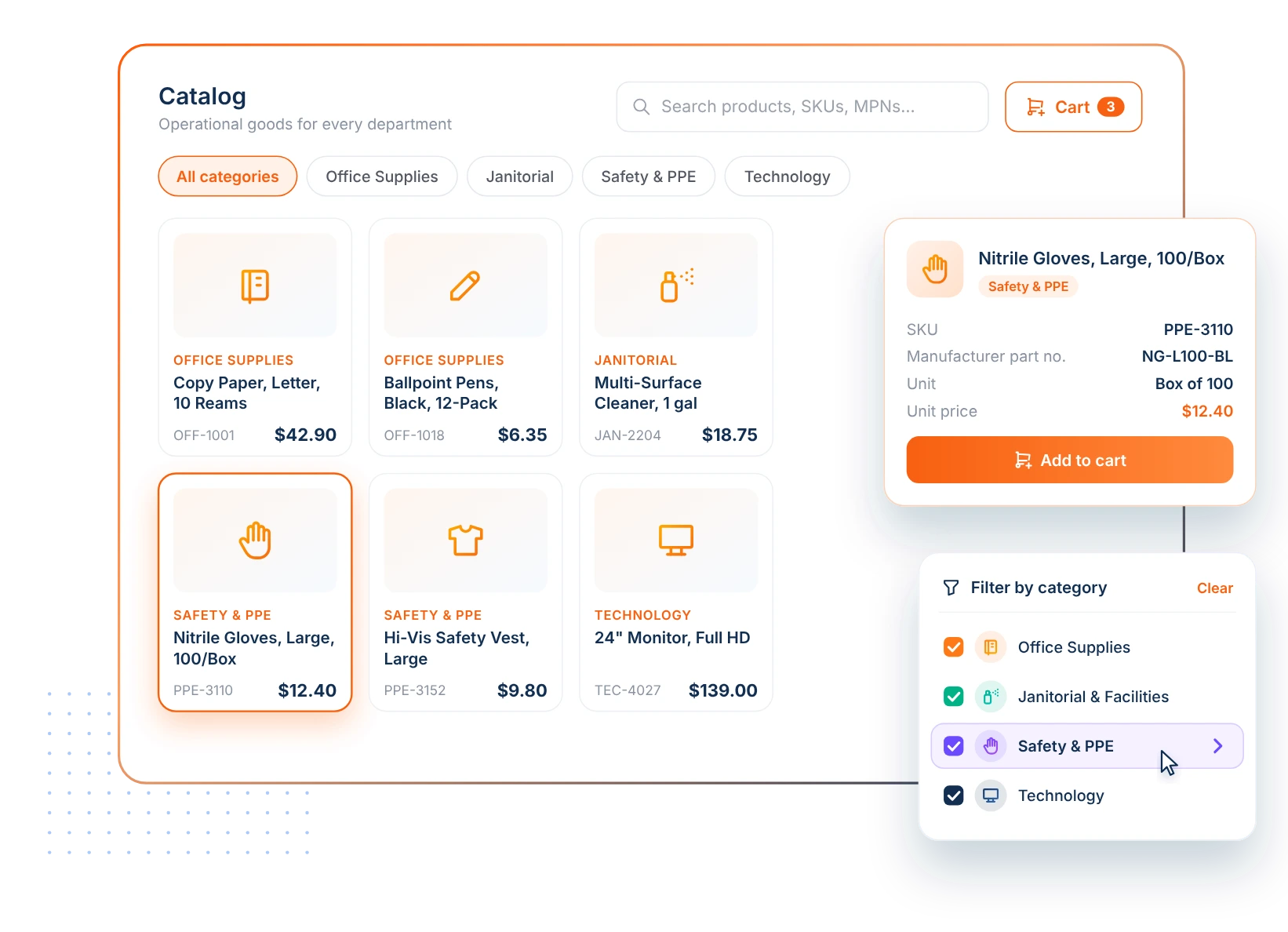
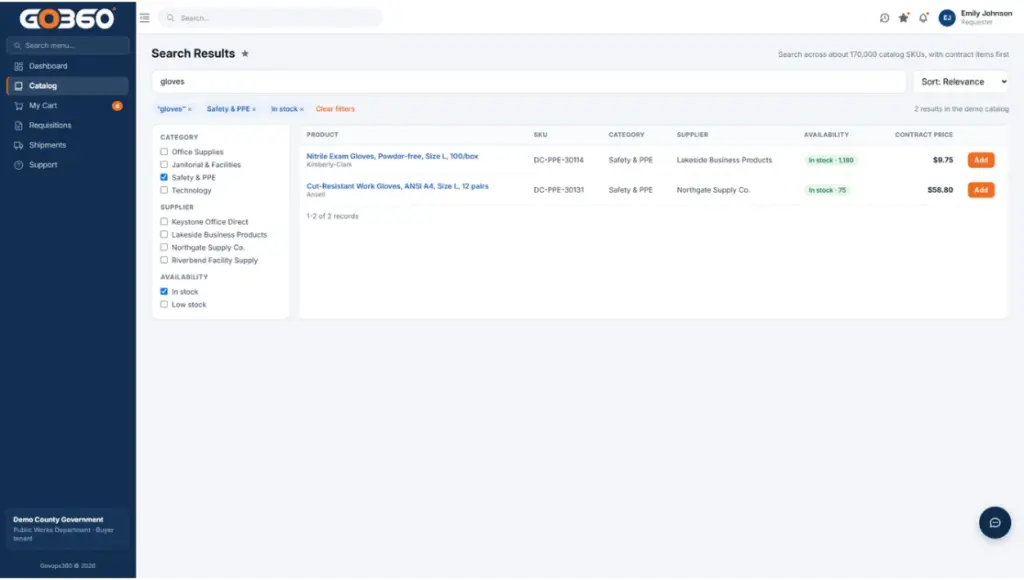
Agency staff search one catalog by keyword, category and status to find the supplies their department needs, from copy paper and cleaning products to safety gloves and monitors. Each product record shows its category, SKU, manufacturer part number and price, so requesters compare like-for-like items before they buy. Catalogs can be grown in bulk through CSV import instead of one item at a time.
02
Purchase Orders Tracked from Draft to Paid
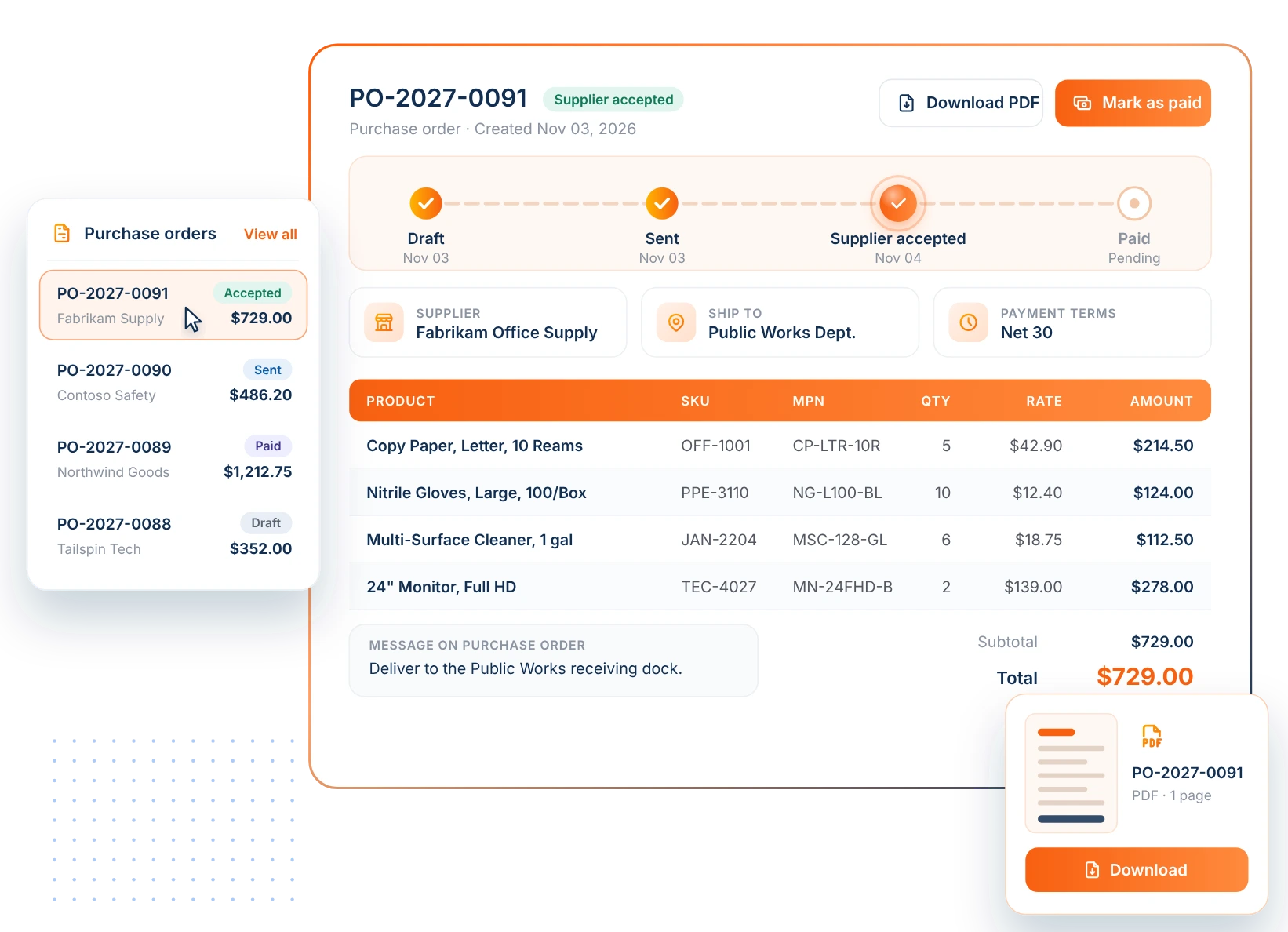
Every purchase order moves through clear statuses, from draft to sent, supplier accepted and paid, so purchasing staff always know where an order stands. Each PO document carries the supplier, ship-to details, line items with SKU and manufacturer part number, quantities, pricing and payment terms. POs can be downloaded as PDF documents for agency records and supplier communication.
03
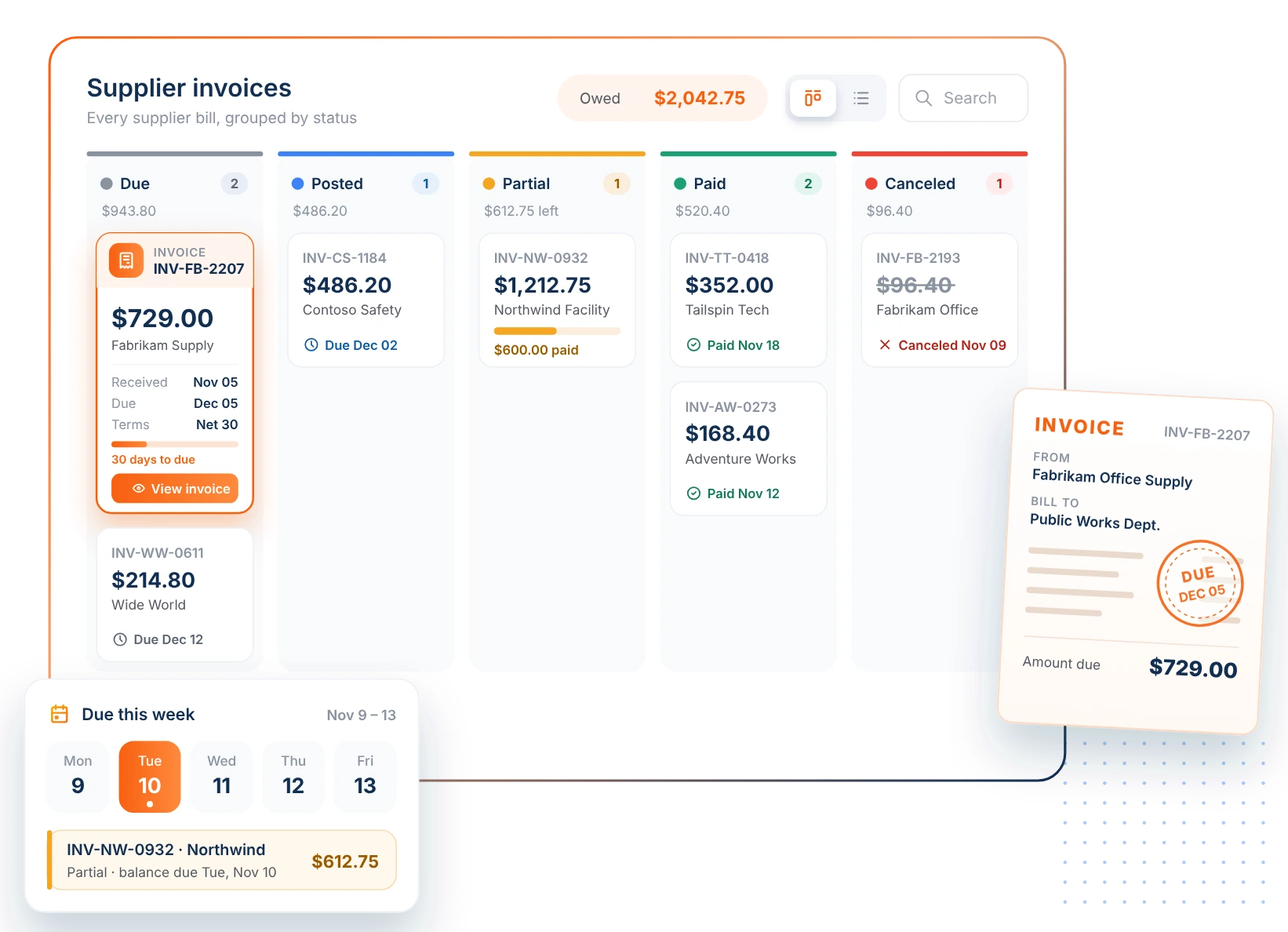
Supplier Invoices in One View
Track every supplier bill in one place, with clear statuses for due, posted, partial, paid and canceled invoices. Finance teams see what the agency owes and when it’s due without chasing paper invoices or separate spreadsheets. Each invoice record keeps its amount, received date and due date together, ready for review and audit.
Who Uses Government Procurement Software?
Government procurement software serves any public entity that buys with public funds and needs to show how each purchase was requested, approved and paid.
State agencies and departments
Central purchasing teams buying for many divisions that need consistent rules across all of them.
Counties
County offices, courts, sheriff and public health departments ordering supplies under one set of policies.
Cities and municipalities
Local government procurement software for public works, parks, libraries and city offices that order supplies every week.
K-12 school districts
Campuses and central offices ordering classroom, custodial and technology supplies.
Colleges and universities
Departments and facilities teams with separate budgets, cost centers and approvers.
Special districts
Water, transit, fire and utility districts whose field crews need PPE and maintenance supplies.
What Operational Goods Can Agencies Buy Through GovOps360?
Operational goods are the everyday supplies public agencies use to keep offices, facilities and field teams running, as opposed to capital equipment or contracted services. GovOps360 organizes them into four core catalogs, plus a section for other common supplies, so staff in every department can find what they need in one place.
Office Supplies and Consumables
The paper, writing and printing supplies every department uses daily.
• Copy paper and specialty paper
• Pens, markers and notebooks
• Folders and filing supplies
• Printer ink and toner
Janitorial and Facilities
Cleaning and upkeep supplies for agency buildings, schools and public spaces.
• Cleaning chemicals
• Paper towels and tissues
• Trash can liners
• Maintenance consumables
Safety and PPE
Protective equipment for field crews, maintenance staff and first responders.
• Protective gloves
• Safety glasses and goggles
• High-visibility vests
• Workplace safety signage
Technology Peripherals and Accessories
The accessories that keep agency workstations and meeting rooms working.
• Monitors and headsets
• Keyboards and mice
• Docking stations
• Cables and adapters
GovOps360 Procurement Capabilities Built for How Public Agencies Buy
Purchasing controls, system connections, pricing records, supplier sourcing and reporting work together on one platform, so every agency purchase stays accountable from request to report.
Purchasing Rules Configured to Your Agency
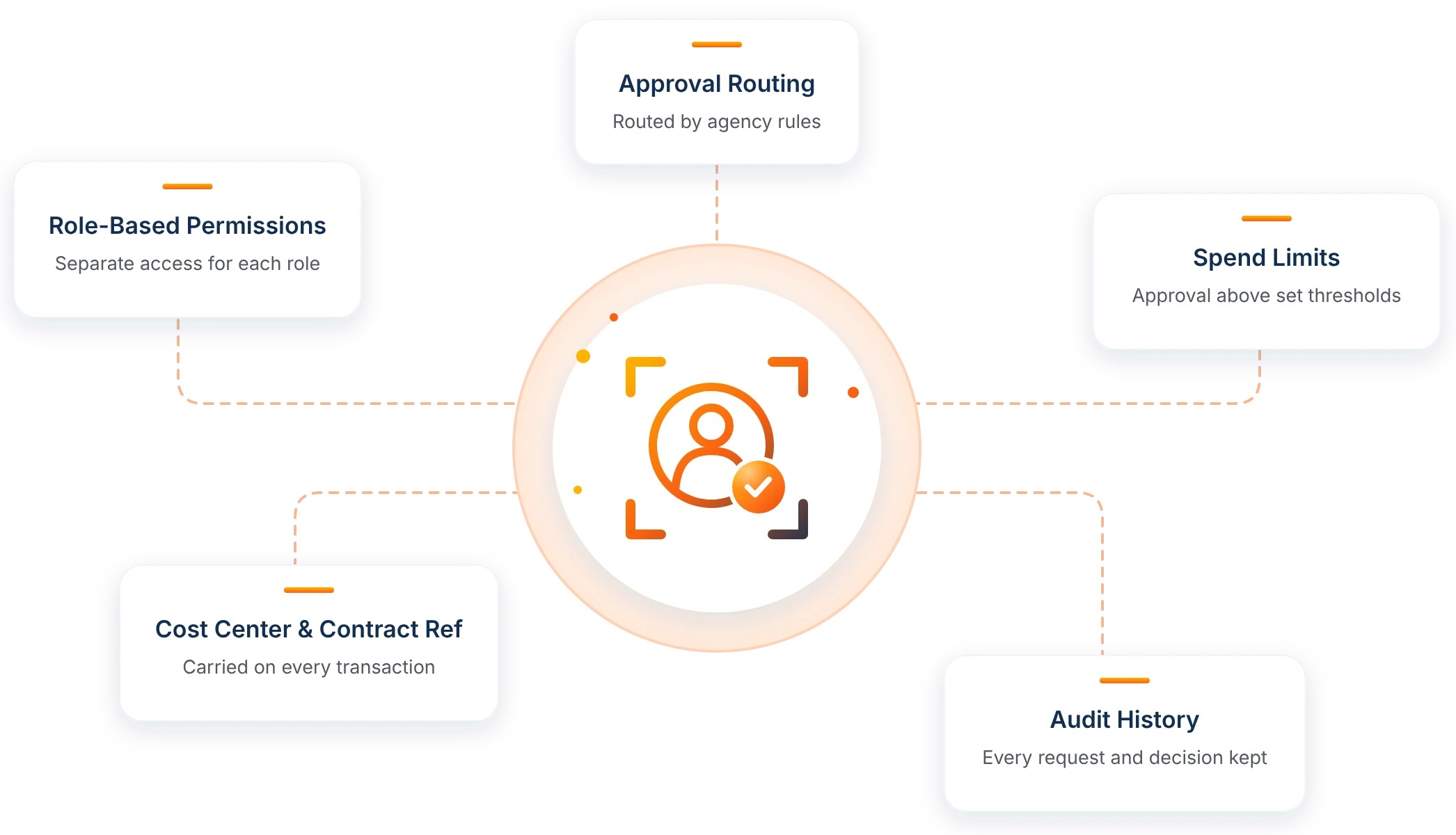
Set who can buy, who approves and how much can be spent, then let every transaction carry the details your agency needs to account for it.
Role-based permissions for requesters, approvers, procurement, finance and auditors
Requisition approval routing based on agency rules
Spend limits that require approval or escalation
Department, cost center, requester, approver and contract reference on every transaction
Purchase order and invoice status from draft to paid, with a full audit history
Connects to Your ERP and Supplier Ecosystem
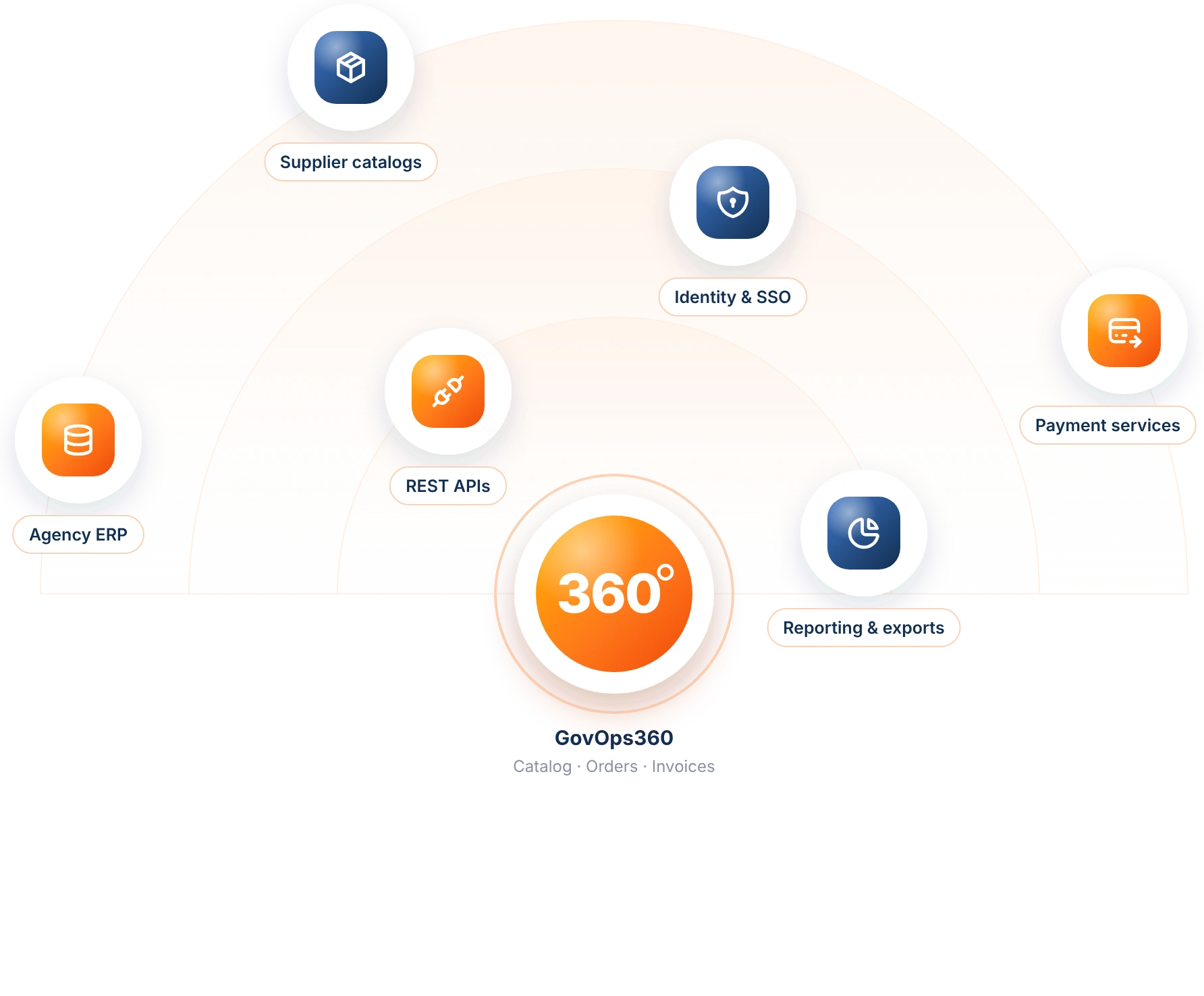
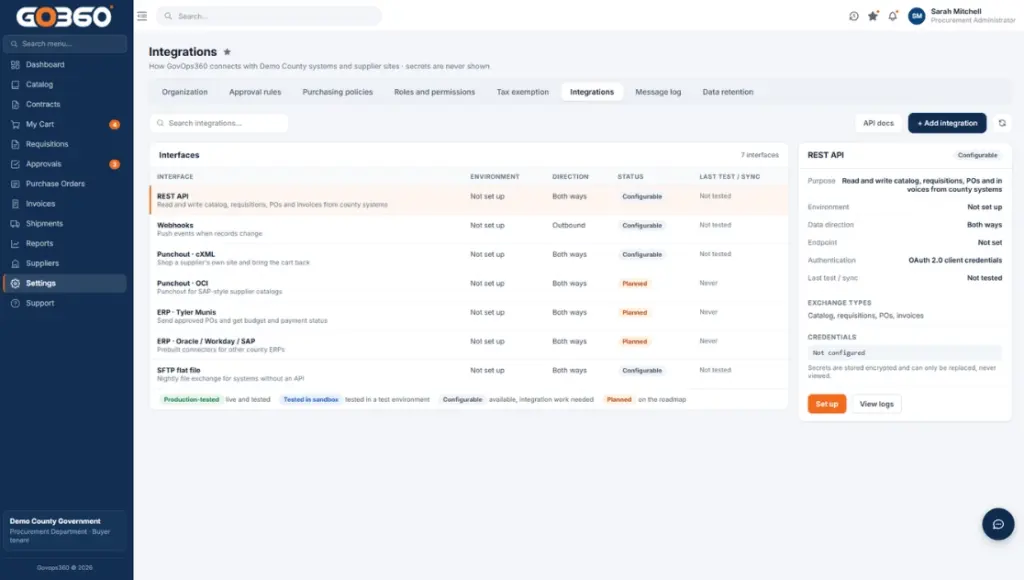
GovOps360 connects agency systems and supplier catalogs, exchanging catalog, order, purchase order and invoice data through REST APIs.
Agency ERP and finance systems
Supplier catalogs and pricing
Payment services for invoice settlement
Reporting and data exports
ERP and punchout connections are scoped and configured with each agency.
Contract Pricing, Tax and Audit Records
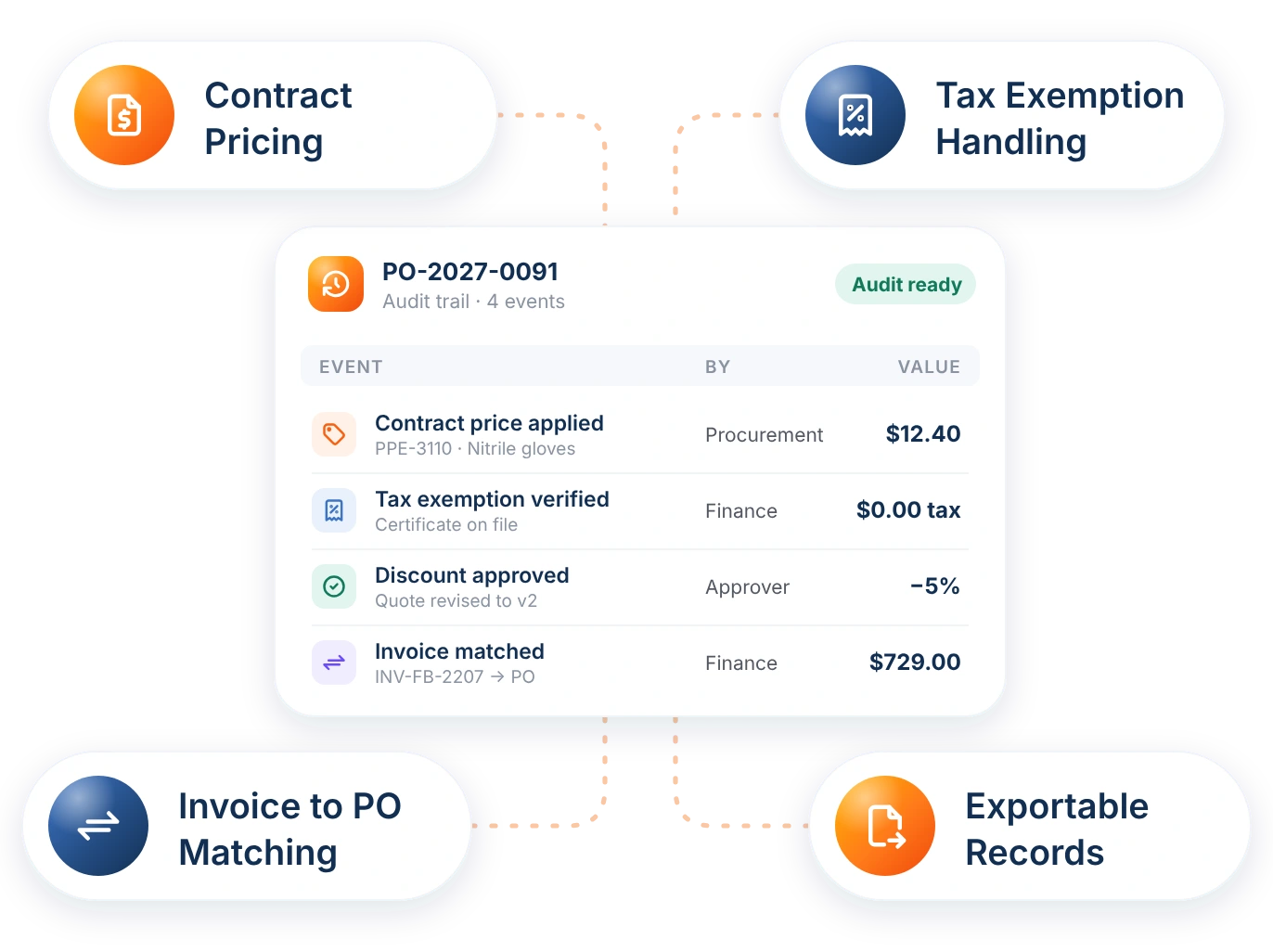
Keep the pricing, approvals and documents behind every purchase together for finance and audit review.
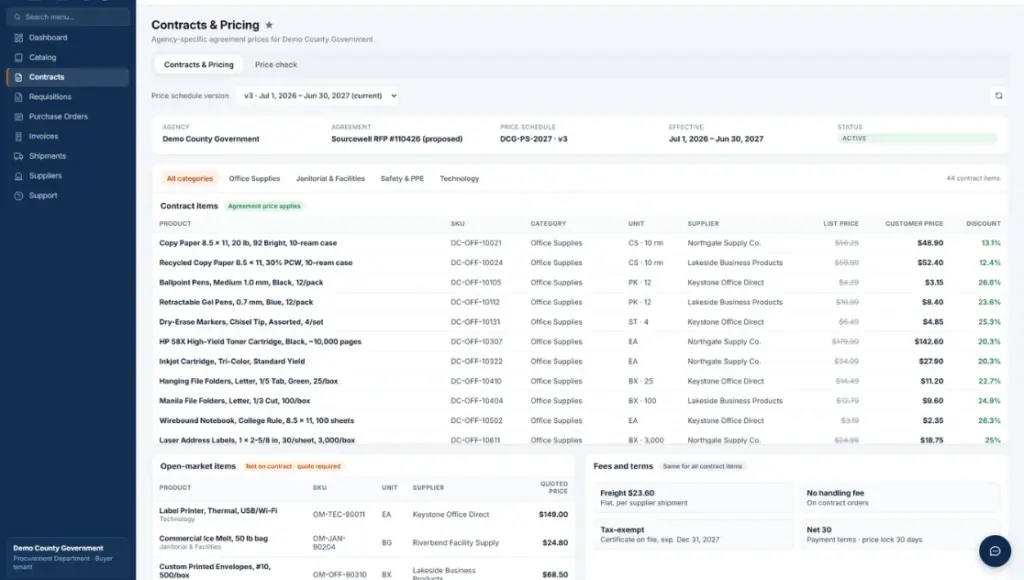
Customer-specific contract pricing
Quote version history and discount approvals
Tax exemption handling
Invoices linked to their purchase order
Exportable transaction records
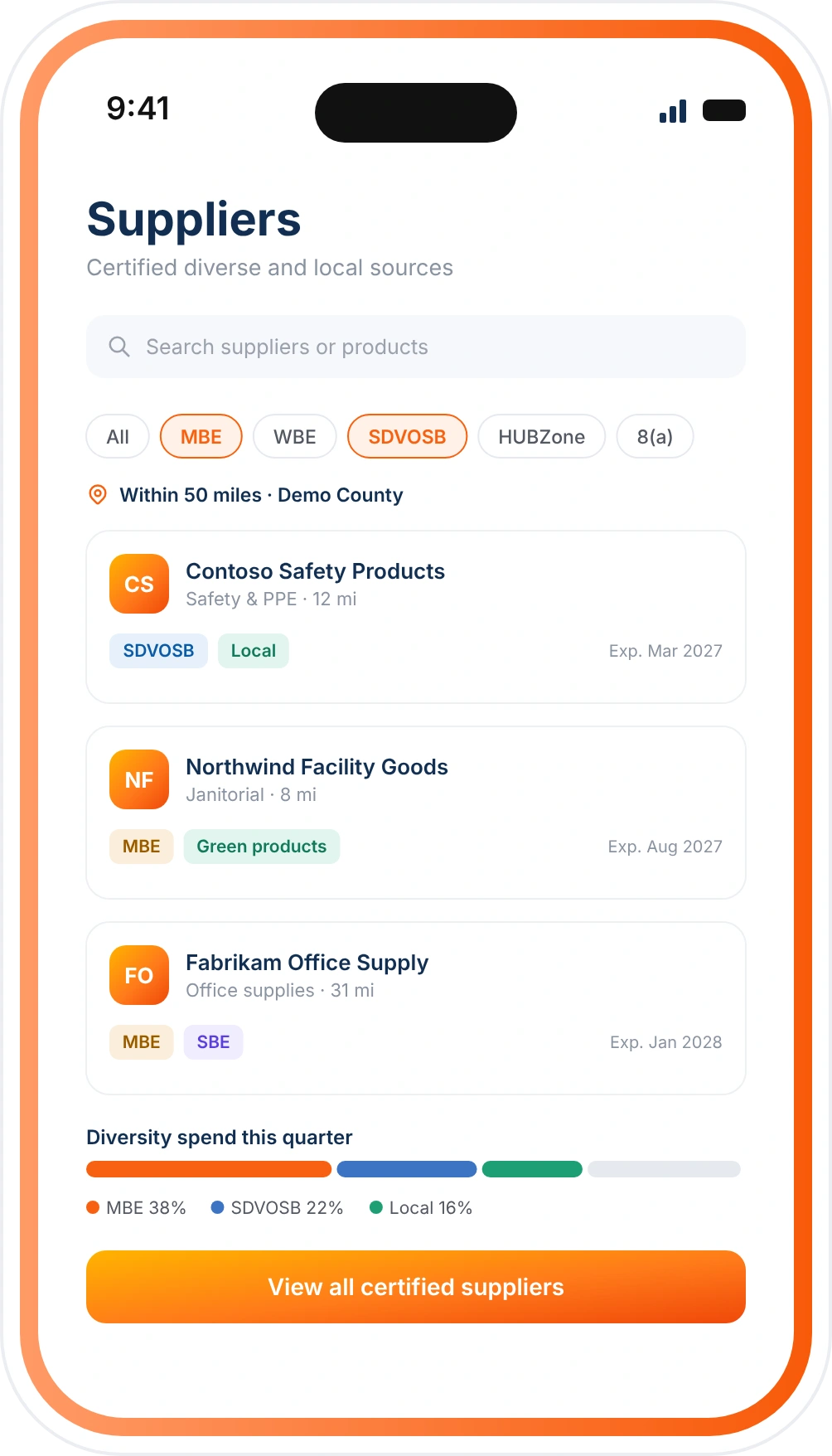
Supplier Diversity and Responsible Sourcing
Find and report on purchases from certified diverse and local suppliers.
MBE, WBE, SBE, DBE, SDVOSB, HUBZone and 8(a) supplier classifications
Location-based supplier search
Environmentally preferable products
Diversity spend reporting
+
1
Manage sourcing, contracts, purchasing, and invoicing with the full cycle solution trusted by thousands of government agencies.
See Where Agency Spend Goes
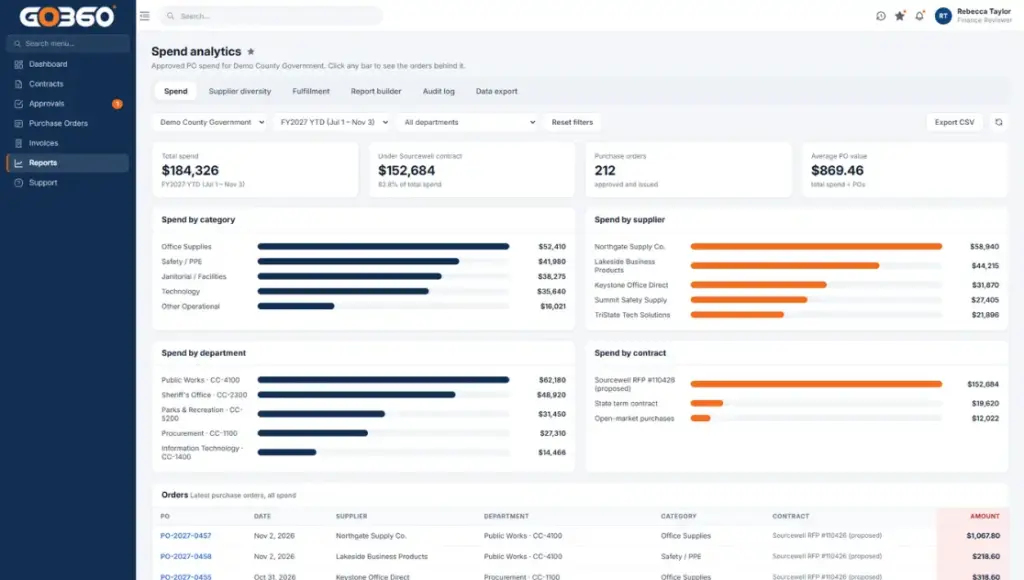
See where agency spend goes, with dashboards and exports for finance and audit teams.
Spend by category, supplier, department and contract
Approval and fulfillment status
Invoice totals and aging
CSV and Excel exports
We’re built around one goal, helping public agencies spend accountably, from the first purchase request to the final audit.
Accountable Purchasing
Keep Every Agency Purchase on One Record
From the first catalog search to the final invoice, every purchase stays on one connected record. Purchasing staff, finance teams and auditors work from the same information, with no spreadsheets, email threads or separate systems to reconcile.
Pricing, approvals, purchase orders and invoices stay together for each transaction, with an activity history of who did what and when. When auditors or the public ask, the records are already in one place and ready to export.
Agency Controls
Your Rules, Your Approvals, Your Spending Limits
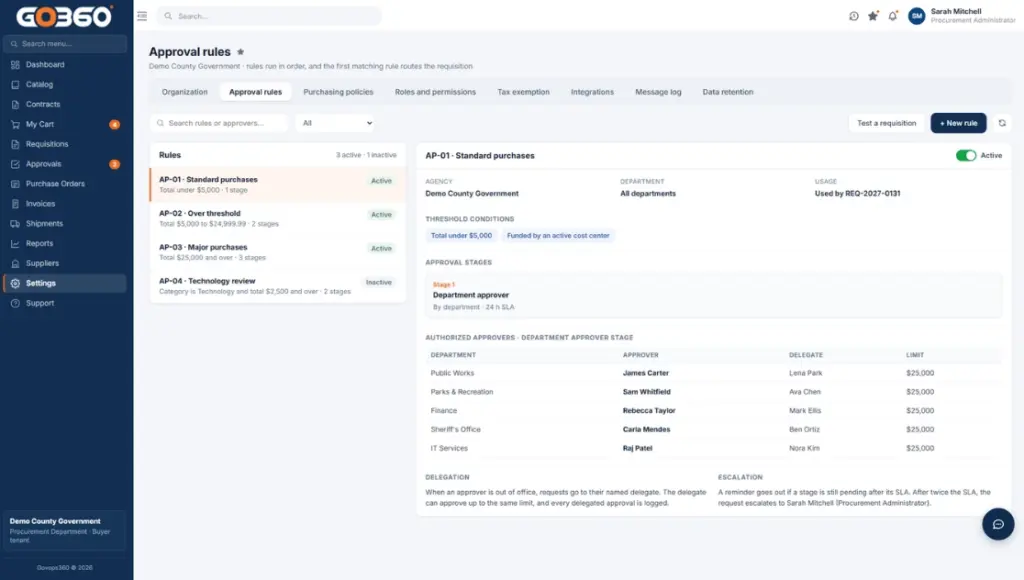
Each agency sets its own roles, approval routing and spending thresholds. Requests above a limit go to the right approver before an order is placed, and requesters cannot approve their own purchases.
GovOps360 keeps the purchasing controls and records your procurement policies rely on, including contract pricing, tax exemption documentation and invoice matching. Your agency stays in charge of the rules that apply to it, and the platform keeps the evidence that they were followed.
Connected Systems
Connects to the Systems Your Agency Already Uses
GovOps360 exchanges catalog, order, purchase order and invoice data through REST APIs, linking agency finance systems, supplier catalogs, payment services and reporting tools.
Connections to your ERP, finance and identity systems are scoped and configured with your team during setup, so the platform fits the way your agency already works instead of replacing it.
How to Choose Government Procurement Software
The right government procurement software fits the way your agency already buys instead of forcing a new process. Use these eight questions to compare options, and ask every vendor to show each one live in a demo.
Can staff in every department find what they need without calling purchasing?
Look for one catalog that staff can search by keyword, category and status, with clear product records. In GovOps360, each listing shows its category, SKU, manufacturer part number and price, so requesters compare like-for-like items before they buy. Purchasing teams can also add products in bulk through CSV import.
Does the system keep your negotiated pricing with each purchase?
Agencies often buy at contract-specific rates, and those prices should follow the order through approval and invoicing. GovOps360 supports customer-specific contract pricing and keeps the pricing, approvals and documents behind each purchase together. When finance or audit teams review a transaction, the price paid and its source are on the same record.
Can you set your own roles, approval routing and spending limits?
Every agency’s purchasing policy is different, so the software should follow your rules instead of imposing its own. In GovOps360, each agency configures who can request, who approves and the spending thresholds that require approval before an order proceeds. Requests above a limit go to the right approver before any purchase order is issued.
Do the requisition, purchase order, shipment and invoice stay linked?
When each step lives in a different system, staff spend hours reconciling them. GovOps360 keeps every purchase on one connected record, from the first catalog search to the final invoice. Purchasing staff can see what was ordered, from which supplier, at what price and where it stands, and finance can see which supplier bills are due, partially paid or settled.
Can you answer an auditor or a public records request in minutes, not days?
Public purchasing has to hold up to review long after the order is paid. GovOps360 keeps each transaction’s pricing, approvals, purchase order and invoice details together, with an activity history of who did what and when. When auditors or the public ask, the records are already in one place and can be exported for review.
How does the software exchange data with your ERP, finance and identity systems?
A procurement platform should work alongside your existing systems, not replace them. GovOps360 exchanges catalog, order, purchase order and invoice data through REST APIs. ERP, punchout and identity connections are scoped and configured with your team during setup, so you know exactly what is connected before you go live.
Can you see where agency money goes and report it without spreadsheets?
Leaders, finance teams and auditors all need to understand spend. GovOps360 provides dashboards and exports that show spend by category, supplier, department and contract, along with invoice totals and aging. Reports can be exported to CSV and Excel for finance reviews, budget planning and supplier diversity reporting.
What does setup include, and who helps your team once you’re live?
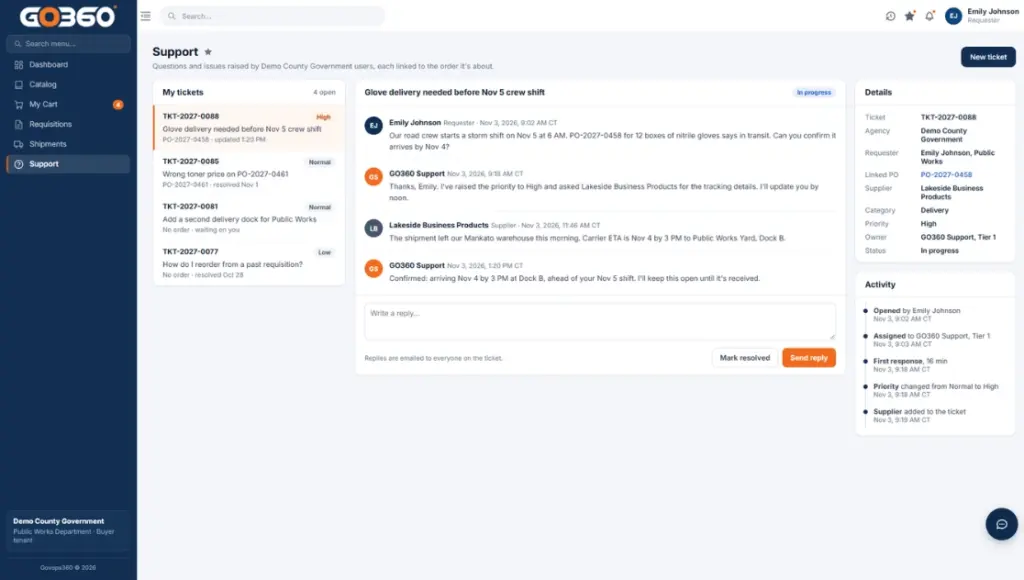
Adoption depends on what happens after the contract is signed. Ask each vendor how users, roles and purchasing rules get configured, and how staff get help with day-to-day questions. The GovOps360 support team works with each agency during setup and stays available after launch through a dedicated support channel.
GovOps360 is built around these eight questions for everyday operational purchasing. Request a demo to see each one in action with your agency’s workflow.
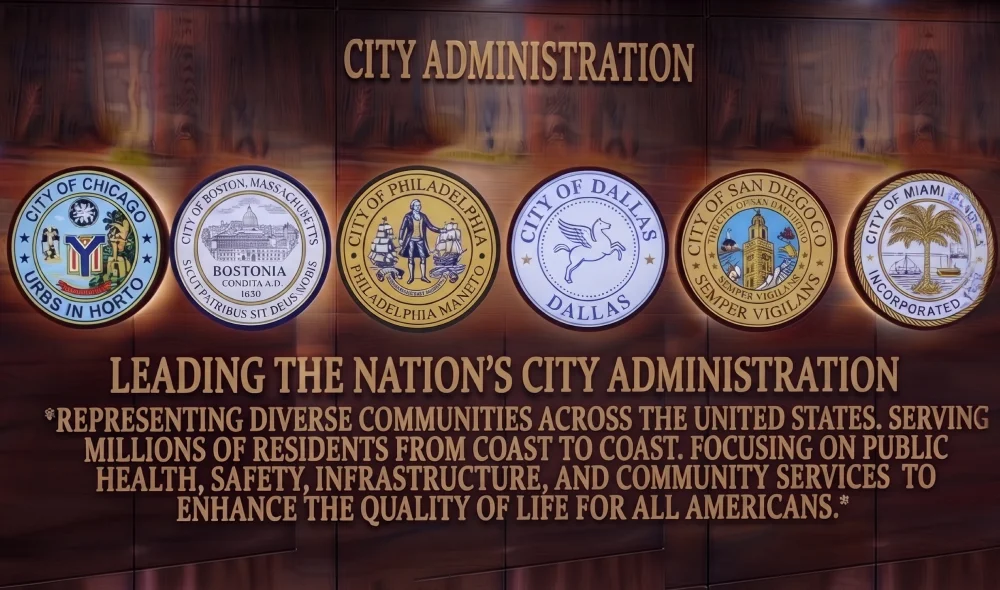
How Cooperative Purchasing Works and How GovOps360 Compares
Cooperative purchasing lets public agencies buy from contracts that another public entity or a government purchasing cooperative has already competitively solicited and awarded, instead of running a new solicitation for every purchase.1, 4 Each agency is still responsible for confirming that a cooperative contract meets its own procurement rules and for keeping records of what it bought, from whom and at what price.2 Many agencies still track those purchases in spreadsheets and email, or in procurement software built for private companies. Here is how GovOps360 compares on the capabilities purchasing, finance and audit teams rely on.
Capability
GovOps360
Spreadsheets & email
Corporate procurement software
One catalog for office, janitorial, safety and technology goods
✓
Separate supplier sites
Varies by setup
Agency-defined approval routing and spending thresholds
✓
Email approvals
✓
Requisition, purchase order and invoice on one record
✓
Separate files
Varies
Contract pricing kept with each order
✓
Manual lookup
Varies
Tax exemption handling for public entities
✓
Manual
Varies
Activity history ready for audits and records requests
✓
Rebuilt by hand
Varies
Built around public-sector purchasing rules
✓
Not applicable
Built for private companies
Federal guidance encourages recipients and subrecipients to enter into state and local intergovernmental or inter-entity agreements for procurement of common or shared goods and services. (Source: 2 CFR 200.318(e), General Procurement Standards, ecfr.gov)
Recipients and subrecipients must maintain records sufficient to detail the history of each procurement transaction, including the procurement method, contractor selection and the basis for the contract price. (Source: 2 CFR 200.318(i), General Procurement Standards, ecfr.gov)
When possible, recipients and subrecipients should ensure that small businesses, minority businesses, women’s business enterprises, veteran-owned businesses and labor surplus area firms are considered in procurement. (Source: 2 CFR 200.321, Contracting with Small and Minority Businesses, ecfr.gov)
NIGP describes cooperative procurement as combining the requirements of two or more public procurement entities, and advises that agencies perform due diligence on a case-by-case basis before using a cooperative contract. (Source: NIGP, Cooperative Procurement: Great Value (Great Confusion), 2013, nigp.org)
Government Procurement Terms Explained
Requisition
An internal request from agency staff to buy goods, submitted for approval before an order is placed.
Purchase order (PO)
The official document an agency sends a supplier to authorize a purchase, listing items, quantities, prices and terms.
Approval routing
The rules that decide who must approve a request, often based on amount, department or category.
Spending threshold
A dollar limit above which a purchase needs additional approval or a different buying method.
Cooperative contract
A contract competitively awarded by one public entity or cooperative that other eligible agencies can buy from.
Invoice matching
Checking a supplier invoice against its purchase order, and the receipt where one is used, before payment.
Cost center
The department or budget unit charged for a purchase.
Tax exemption certificate
The document showing that a public entity is exempt from sales tax on qualifying purchases.
Operational goods
Everyday supplies such as office, janitorial, safety and technology items, as opposed to capital equipment or services.
Audit trail
The time-stamped history of who requested, approved, ordered and paid for each purchase.
Got Questions? We’ve Got Answers.
Government Procurement Software FAQs
Find quick answers or contact our support team.
Our support team is here to guide you every step of the way. If you have questions or need personalized help, reach out anytime. We’re just a message away. You can also review our Trust Center and Accessibility Statement.
Government procurement software is the system public agencies use to buy goods and services through a controlled, auditable process. It covers finding items in an approved catalog, approving requests, issuing purchase orders, matching invoices and reporting on spend, all on one connected record.
2.Who can use GovOps360 for procurement?
GovOps360 is a government procurement platform built for public agencies, including state agencies and departments, counties, cities and municipalities, K-12 school districts, colleges and universities, and special districts. Each agency sets up its own users, roles and purchasing rules.
3.What products can agencies buy through GovOps360?
GovOps360 organizes operational goods into four core catalogs: office supplies and consumables, janitorial and facilities supplies, safety and PPE, and technology peripherals and accessories. Each product listing shows its category, SKU, manufacturer part number and price.
4.How does GovOps360 track a purchase from order to payment?
Every purchase order moves through clear statuses, from draft to sent, supplier accepted and paid. Supplier invoices are linked to their purchase order and tracked as due, posted, partial, paid or canceled, so finance teams always know what the agency owes.
5.Can agencies set their own approval rules and spend limits?
Yes. Purchasing rules are configured for each agency, including who can request, who approves and the spending thresholds that require approval before an order proceeds.
6.Does GovOps360 integrate with our ERP or finance system?
GovOps360 exchanges catalog, order, purchase order and invoice data through REST APIs. ERP, punchout and identity connections are scoped and configured with each agency during setup.
7.How does GovOps360 support audits and records requests?
Each transaction keeps its pricing, approvals, purchase order and invoice details together, with an activity history of who did what and when. Records can be exported for finance and audit review.
8.Does GovOps360 make an agency compliant with procurement regulations?
No software alone makes an agency compliant. GovOps360 supports procurement record-keeping and purchasing controls, and each agency remains responsible for following the federal, state and local procurement rules that apply to it.
9.What is the difference between a requisition and a purchase order?
A requisition is an internal request from agency staff to buy something, and it goes through approval first. A purchase order is the official document the agency sends to the supplier once the request is approved, authorizing the purchase at the listed items, quantities and prices.
10.What is cooperative purchasing?
Cooperative purchasing lets a public agency buy from a contract that another public entity or a government purchasing cooperative has already competitively solicited and awarded, instead of running its own solicitation. Each agency still confirms the contract meets its own procurement rules.
11.How is government procurement software different from corporate procurement software?
A government procurement platform is built around public-sector requirements: purchases funded by public money, approval rules set by policy, contract-based pricing, tax-exempt purchasing and records that auditors or the public may request. Corporate tools often focus on supplier negotiation and savings, while government tools give equal weight to transparency and a complete record of every decision.
See GovOps360 Built Around Your Agency’s Purchasing Rules
Walk through the full procurement workflow with our team, from catalog search and approvals to purchase orders, invoices and spend reporting. We’ll show how GovOps360 fits your departments, roles and approval thresholds.