



Government Contract Lead Management Software for Federal & SLED Teams
GovOps360 Lead Management gives government contractors a structured pipeline for government contract leads to intake opportunities from federal and SLED portals, analyze fit against past performance, assign tasks to BD teams, and advance leads through every stage from identification to proposal submission and contract award.
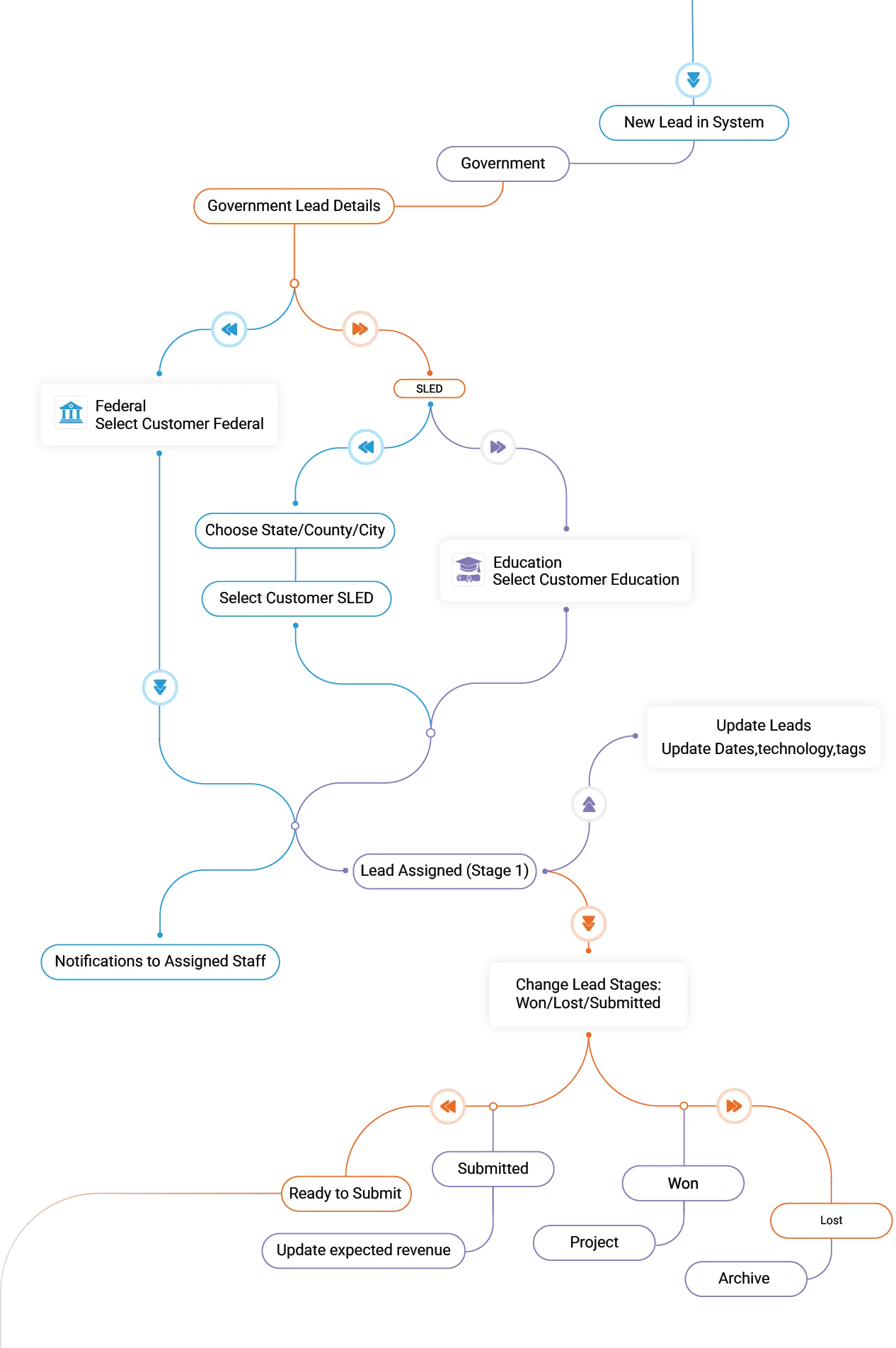


All government contract leads are automatically scored against your past performance history, NAICS codes, small business certifications, and team capacity, giving your BD managers a PWIN estimate before committing pursuit resources

Government Contract Lead Management
How GovOps360 Automates the Full Lead Lifecycle
GovOps360 Lead Management automates the full government contract leads lifecycle from automated intake of federal and SLED opportunities to AI-powered scope analysis, team task assignment, stage-based pipeline progression, and post-award project handoff. Government contractors using a structured lead management platform pursue more qualified opportunities, make faster go/no-go decisions, and maintain a traceable pipeline from initial government contract leads to contract awards.
Five Stages of Government Contract Lead Management
Lead Intake Across Federal, State, Local & Education (SLED)
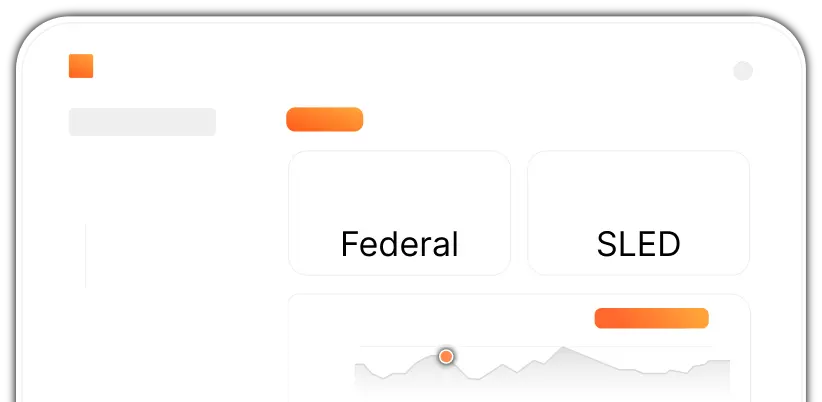
All government contract leads enter GovOps360 through a structured intake pipeline from federal agencies, state and county governments, city procurement portals, or education institution programs. The system automatically categorizes each lead, captures key metadata (agency, NAICS code, set-aside type, due date), and triggers team notifications immediately. No opportunity enters your pipeline uncategorized or untracked.
AI-Powered Scope of Work Analysis & Requirement Extraction
GovOps360 reads every attached RFP, RFI, and solicitation document for government contract leads and automatically generates a structured Scope of Work summary including technical requirements, mandatory certifications, compliance obligations, evaluation criteria, and submission deadlines. What previously required a capture manager to spend two to three hours reading a 200-page RFP is delivered in seconds. Your team sees exactly what is required before deciding whether to pursue.
Go/No-Go Fit Analysis Based on Past Performance & Capabilities
GovOps360 automatically scores every lead against your documented past performance, active certifications, NAICS codes, incumbent relationships, and available team capacity. The system generates a fit score highlighting alignment gaps and strengths so BD managers can make confident go/no-go decisions in minutes, not days. Teams using structured go/no-go analysis report win rates up to 11% higher than those pursuing every available opportunity.
Structured Task Assignment & Team Collaboration for Every Bid
Every lead in GovOps360 has a built-in collaboration workspace download solicitation documents, assign pursuit tasks to BD team members or proposal writers, set deadlines, track dependencies, and share notes in one place. BD managers have full visibility into who owns what, what is overdue, and where the team is blocked. When the RFP drops, your team is organized and ready, not scrambling.
Stage-Based Lead Tracking from Pursuit to Award
Advance every lead through a defined pipeline with a single click from Identified to Qualified, Ready to Submit, Submitted, Won, or Lost. Won leads automatically convert into active projects with billing, staffing, and performance tracking. Lost bids are archived with detailed reasons, feeding a lessons-learned repository that improves future go/no-go decisions. Every stage transition is logged for audit reporting and win rate analytics.
Six Ways GovOps360 Lead Management Accelerates
Your Government Contract Pipeline
Real-Time Government Contract Pipeline Dashboard
GovOps360 updates your lead pipeline in real time, surfacing new federal and SLED opportunities as they are posted. See every active lead’s status, priority level, assigned team member, submission deadline, and attached documents in one dashboard view. Save custom filter profiles by agency, NAICS code, contract value, and set-aside type. Your BD team always sees the most current government contract leads first.
Task Ownership & Real-Time Collaboration Across BD Teams
Assign every bid, document review, and proposal task to the right team member with clear ownership, due dates, and priority levels. BD managers, capture managers, and proposal writers work in a shared collaboration space with real-time progress updates, document sharing, and inline notes. Built-in dependency tracking ensures the right tasks are completed in the right order, and nothing delays your proposal submission.
Automated SOW Extraction from RFPs and Solicitation Documents
GovOps360 automatically extracts the complete Scope of Work from any uploaded RFP, RFI, RFQ, or solicitation document — identifying technical requirements, mandatory certifications, key deliverables, evaluation factors, and period of performance. No manual reading of 200-page documents. No missed requirements. The AI-generated SOW summary is ready within seconds of document upload, giving your capture team an immediate head start on proposal planning.
Centralized Document Management for Every Government Bid
GovOps360 automatically creates a structured document folder for every lead with separate subfolders for RFPs, amendments, Q&A transcripts, past performance records, team correspondence, and final proposal submissions. All files are version-controlled, accessible to assigned team members, and linked directly to the lead record. When an auditor, contracting officer, or new team member needs a file, it takes one click, not a hunt through email threads and shared drives.
Capture Notes & Bid Task Management in One Workspace
Every lead in GovOps360 has a built-in notes and task management workspace. Log strategy decisions, agency meeting notes, teaming partner discussions, and compliance observations as they happen. Create and assign tasks with priorities, due dates, and completion tracking, all linked to the specific lead. Your entire capture team works from the same up-to-date record, eliminating conflicting versions and lost context between handoffs.
Government Contract Deadline & Pre-Bid Meeting Calendar
GovOps360’s integrated calendar automatically populates submission deadlines, question period close dates, pre-bid conference times, and project milestones from every active lead synced with Microsoft 365 and Google Workspace. Set automated reminders for critical dates and share the calendar across your entire BD and proposal team. Government contract deadlines are non-negotiable. GovOps360 ensures your team never misses one.
Built for Government BD, Capture, and Proposal Teams – Every Stage Covered
GovOps360 gives government business development teams a fully unified pipeline for every federal and SLED opportunity, organized, AI-enriched, and traceable from first identification to contract award. Capture managers see fit scores. Proposal teams see document status. Executives see pipeline value, win rate trends, and revenue forecasts. Everyone works from the same real-time government contract leads data.
Single pipeline for every Federal and SLED government contract leads opportunity, unified in one organized workspace.
AI automatically categorizes every lead by agency type, NAICS code, set-aside classification, contract vehicle, technology domain, and submission timeline.
Advance government contract leads through Shipley-aligned pipeline stages from Identification and Qualification through Proposal Submission to Won or Lost with full audit trail logging for compliance & reporting.
Track win rates by agency, NAICS code, and bid type. Monitor pipeline velocity, B&P budget utilization, and team workload distribution. Export pipeline reports for executive reviews and quarterly BD planning.
How GovOps360 Government Contract Lead Management Compares to Other BD Platforms
Finding a government contract opportunity is only the beginning. Managing it, assigning your team, analyzing the scope, tracking its stage, and converting it into an active pursuit is where many platforms fall short. Most solutions simply track opportunities in a database. GovOps360 manages the complete lead lifecycle, from Federal and SLED intake through AI-powered classification, team collaboration, and stage-based pipeline tracking from opportunity discovery through contract award.
| Capability | GovOps360 | Market-intelligence tools | ERP / finance tools | BD / proposal tools |
|---|---|---|---|---|
| Structured lead profiles & pipeline tracking | ✓ | ✓ | Limited | Limited |
| Activity logging & follow-up per lead | ✓ | Limited | Limited | Limited |
| Early qualification / scoring before proposal | ✓ | Varies | Limited | Limited |
| Leads created directly from captured opportunities | ✓ | Limited | Typically not | Limited |
| Lead to proposal to contract in one platform | ✓ | Typically not | Typically not | Typically not |
- SAM.gov federal opportunity source feeding the lead pipeline (Source: Federal Contract Opportunities (including Contract Award Data), SAM.gov)
- U.S. Small Business Administration How to win contracts (capture & qualification guidance) (Source: U.S. Small Business Administration, sba.gov)
- SAM.gov lists over 40,000 active federal solicitations at any point in time, each requiring lead intake, team assignment, scope analysis, and stage-based tracking to convert into a qualified pursuit. BD pipeline tracking platforms manage opportunity data but do not automate the full lead lifecycle required to work this volume effectively. (Source: SAM.gov Active Solicitation Data 2024 / deltek.com/en/products/govwin-iq)
- SLED (State, Local & Education) government contract spending represents an estimated $2.5 trillion annually, making SLED lead coverage a critical capability for contractors pursuing non-federal opportunities. (Source: National Association of State Procurement Officials (NASPO), 2024)
- The US Small Business Administration reported that the federal government awarded approximately 28.4% of eligible contract dollars to small businesses in FY2024, a volume of opportunity that demands structured lead management for small contractors to compete effectively. (Source: SBA FY2024 Small Business Federal Contracting Scorecard, sba.gov)
Got Questions?
We’ve Got Answers.
Find quick answers or contact our support team.
Our support team is here to guide you every step of the way. If you have any questions or need personalized assistance, reach out to us anytime. We’re just a message away.
1. What is lead management in government contracting?
2. Where do government contract leads come from in GovOps360?
3. What is SLED in government contracting?
4. How does GovOps360 determine whether to pursue a government contract lead?
5. Can multiple team members collaborate on the same government contract lead?
6. What happens when a government contract lead is won?
7. What is the Shipley method and does GovOps360 support it?
8. How does GovOps360 track win rates for government contracts?
9. Does GovOps360 integrate with proposal generation tools?
Build a Government Contract Pipeline That Wins – Not Just Tracks
GovOps360 Lead Management gives government contractors a structured pipeline to intake federal and SLED opportunities, analyze fit in minutes, collaborate across BD and proposal teams, and advance every lead from identification to contract award, all in one platform. Join government contractors who have replaced disconnected spreadsheets and CRMs with a purpose-built GovCon console.